Claude Code, Internal Tools, Nonprofit Operations
StuffRescue CRM: A Claude Code Research Engine for Nonprofit Outreach
A custom CRM I designed and built with Claude Code for StuffRescue's outreach. It researches potential partners and donors on its own, sorts them into calling lists every weekday morning, and switches with one control between partner outreach and gaming-based fundraising.
 StuffRescue
- 01 Problem
A small nonprofit needed hundreds of qualified partners and donors, but off-the-shelf CRMs don't know who funds charity in Ohio, and prospect data from sales vendors costs more than an early-stage nonprofit can spend.
- 02 Approach
A purpose-built CRM where Claude does the research: daily discovery runs, on-demand lookups for any organization, and email drafting, all running on the team's existing Claude Code usage.
- 03 Outcome
More than 300 researched contacts across five outreach collections, plus a separate fundraising view that maps millions of dollars in legally required charitable giving by distance and meeting date.


Project summary
This is the first in a series of Claude Code case studies. StuffRescue runs on partnerships: churches, shelters, caseworkers and community groups that bring needs into the Wish Program, and funders that keep the platform free. Finding and working those relationships is research-heavy, and a small team can't afford a research department. So I designed and built our own CRM, with Claude doing the research.
It does the kind of prospect research a sales team would buy from a data vendor such as Apollo, but it's tuned to a nonprofit's world. Claude finds potential donors such as American Legion posts and Fraternal Order of Eagles aeries, organizations that could run campaigns in the Wish Program, independent caseworkers and social workers, and philanthropic funders. Every weekday it categorizes what it finds into calling lists.
The problem
Off-the-shelf CRMs are built for sales pipelines. They don't know that a veterans' post with a bingo license is required by law to give money to charity, that a geriatric care manager's clients are often downsizing, or that a shelter's privacy rules change how a campaign can be written. Prospect data vendors know even less about this world, and their pricing is built for sales teams, not nonprofits.
What we needed was narrower and smarter: a calling list that already knew why each organization might say yes, and what to say first.
Two modes, one switch
The most important design decision sits at the very top of the screen: a single switch between Outreach and Legion & Eagles. They're different businesses, so they get completely different views.
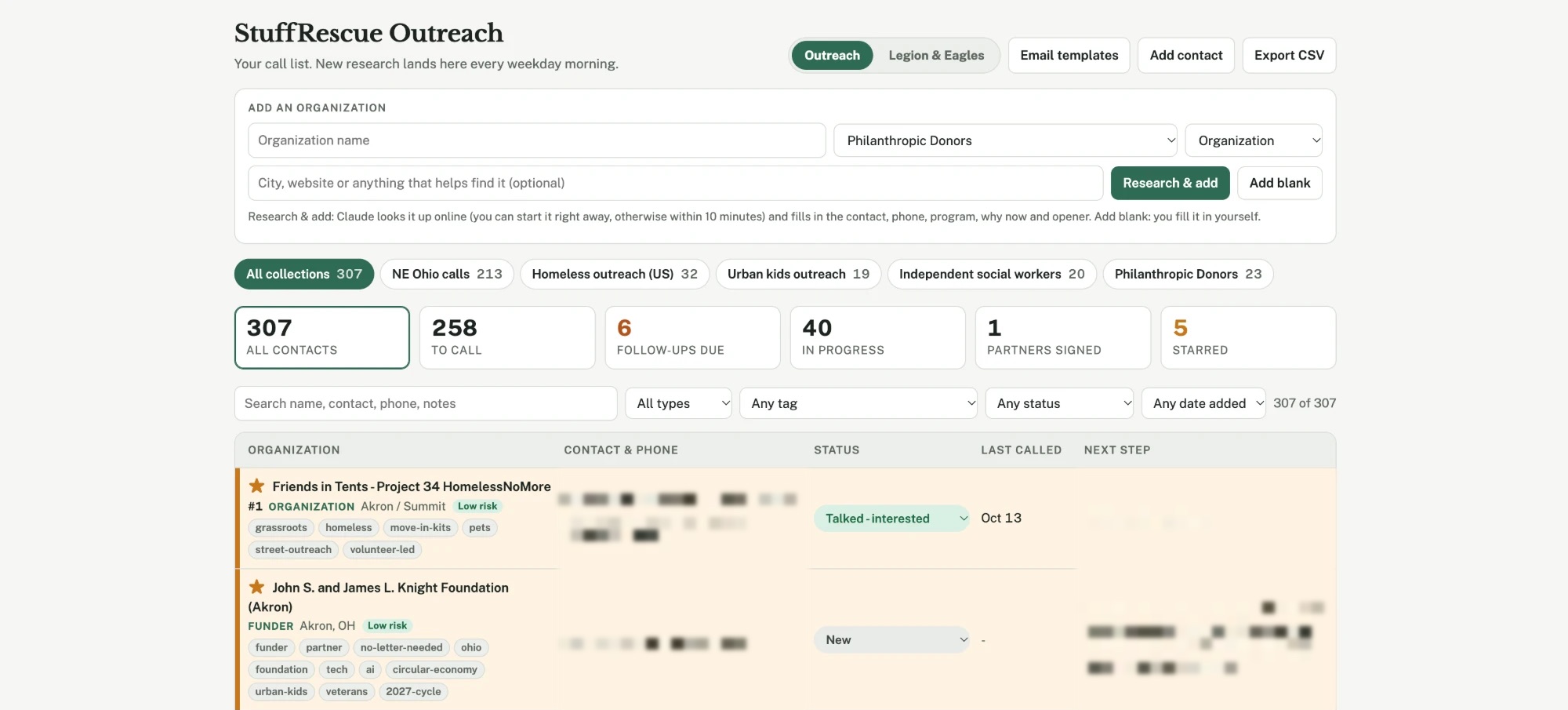
- Outreach is partner development for the Wish Program. Contacts live in collections such as NE Ohio calls, Homeless outreach, Urban kids outreach, Independent social workers and Philanthropic donors, each with its own tags, risk rating and next step.
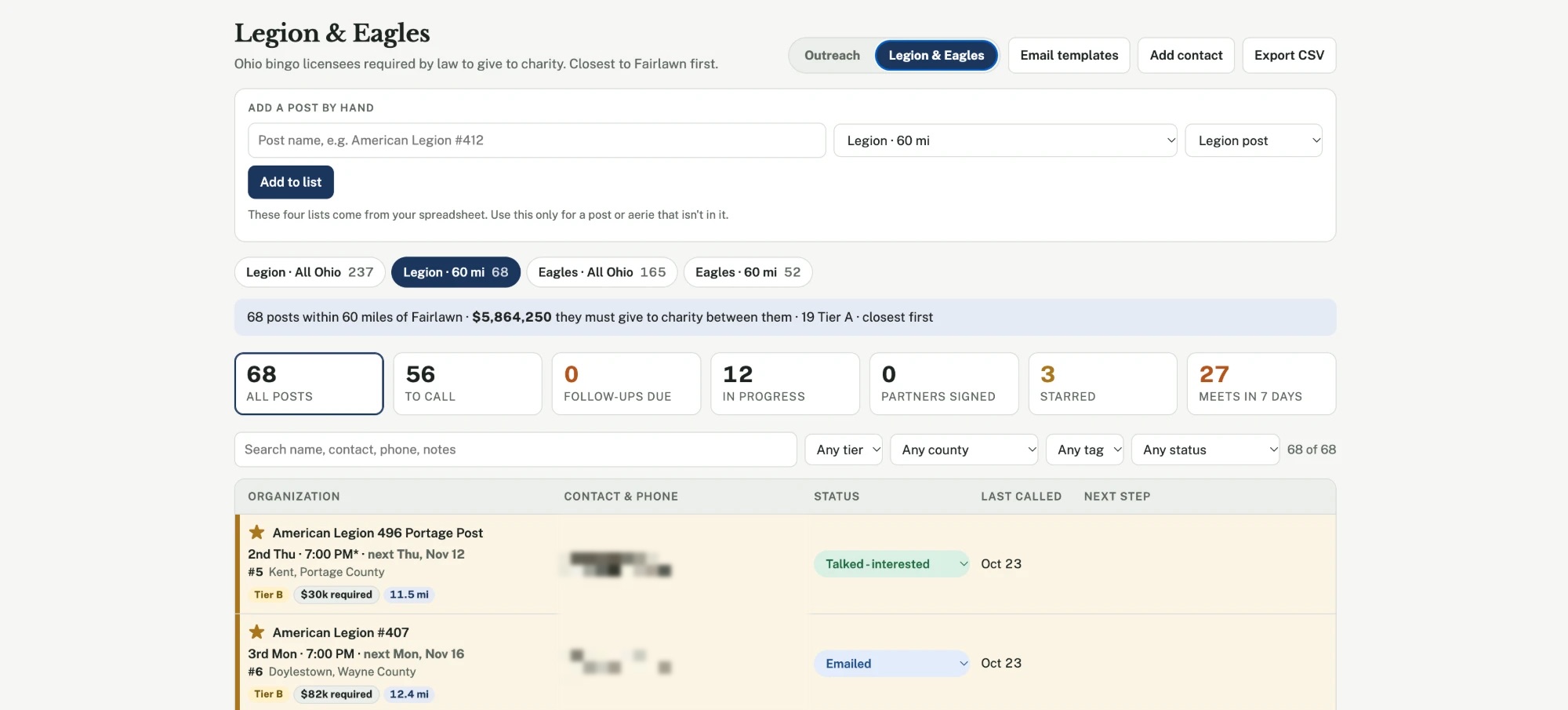
- Legion & Eagles is fundraising from gaming. American Legion posts and Fraternal Order of Eagles aeries that hold Ohio bingo licenses are required by law to give to charity, so the CRM treats them as their own pipeline. Four lists cover Legion and Eagles, statewide and within 60 miles of our Fairlawn base, sorted closest first. A summary line shows the giving at stake, for example 68 posts within 60 miles that must give a combined $5,864,250 to charity.
Gaming organizations decide at their meetings, so the fundraising view is built around time as well as distance. Each post shows its meeting schedule and the next date ("2nd Thu, 7:00 PM, next Thu, Nov 12"), its tier, the giving it's required to make and how far away it is. A "Meets in 7 days" count tells me who to call this week.
Research on demand
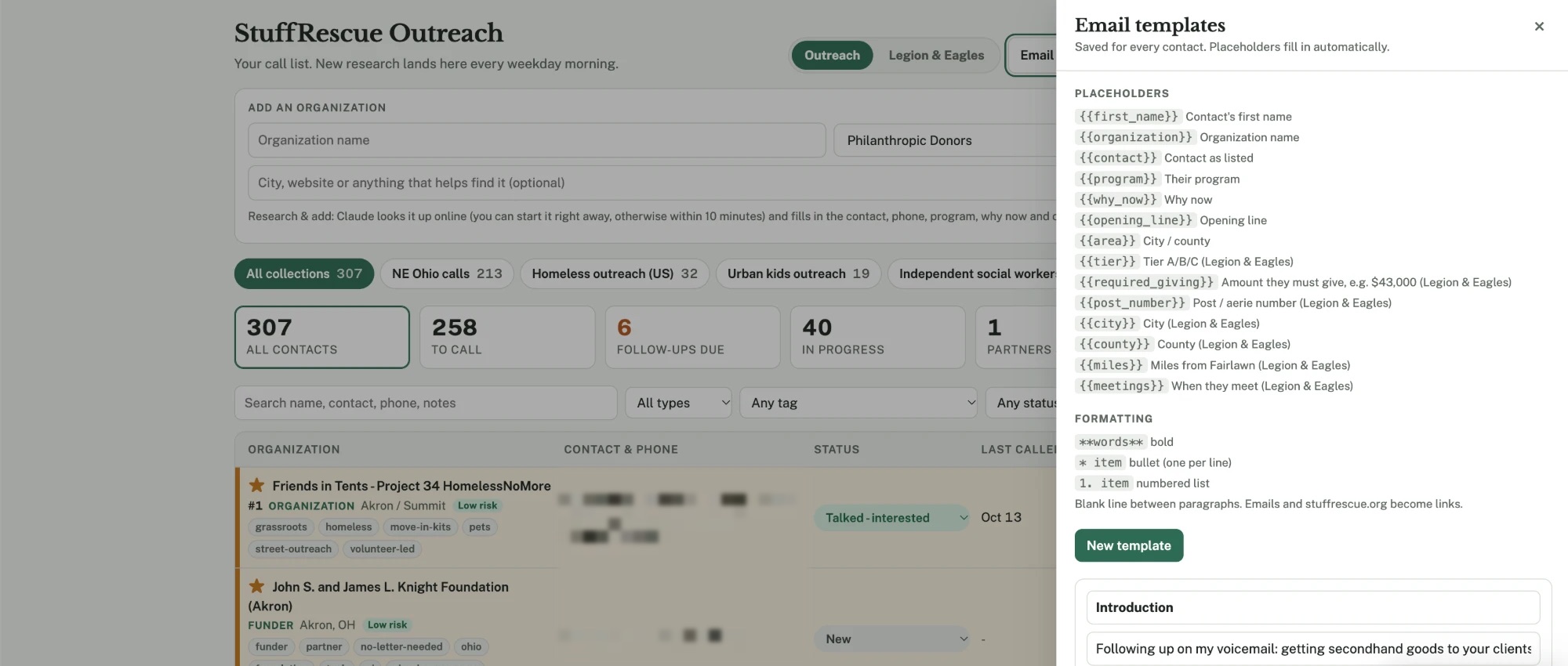
The newest feature closes the gap between the CRM and the open web. When I hear about an organization that isn't in the database, I type its name, plus a city or website if I have one, and choose Research & add. Claude looks it up online, starting right away or within ten minutes, and fills in the contact, phone, program, why now and an opening line. Add blank is there when I'd rather fill in a record myself.
Behind that, a daily research run adds new organizations every weekday morning and files them into the right collection, so the list keeps growing without anyone opening a spreadsheet.
Every contact has a memory
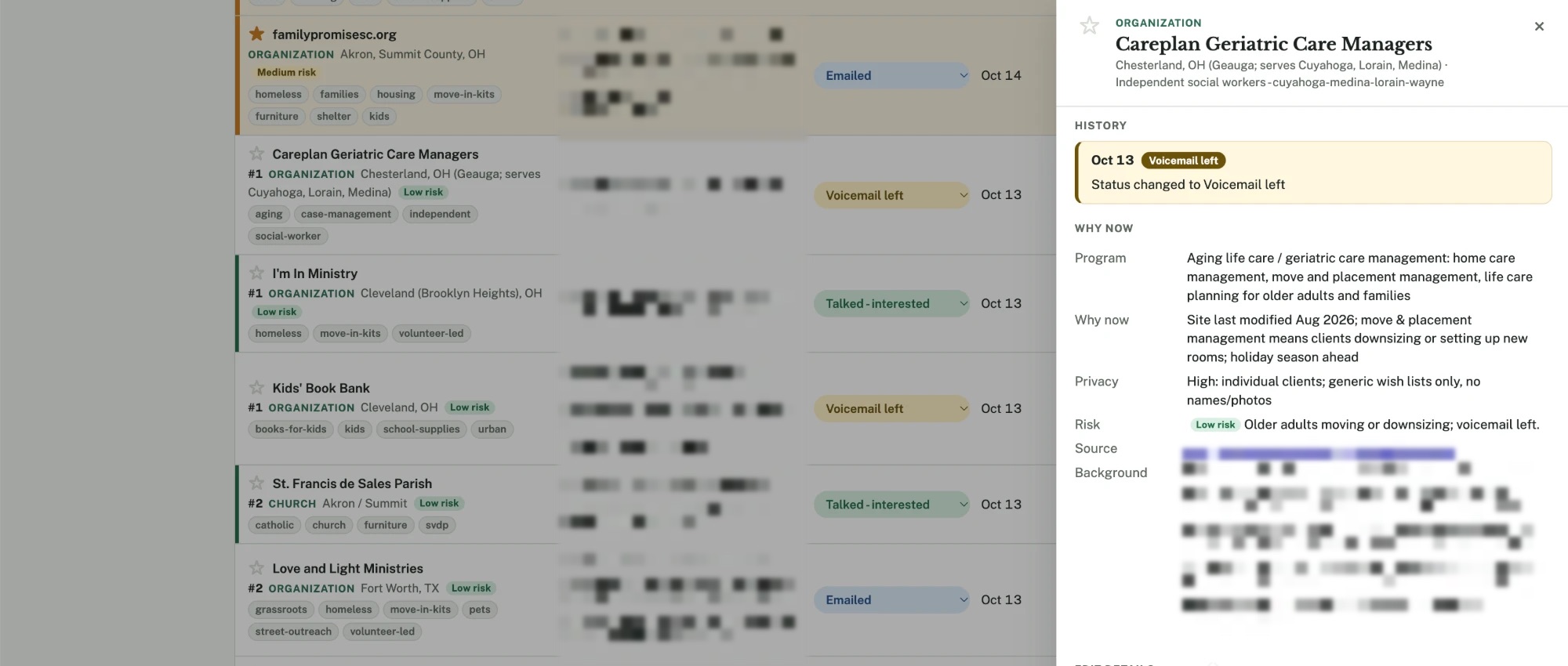
Selecting a contact opens a side panel that holds the whole relationship:
- History. Every status change, email, text and conversation, saved and timestamped, so anyone on the team can pick up where the last call left off.
- Why now. Claude's research in a consistent shape: the organization's program, why this is a good moment to reach out, a privacy level, a risk rating, the source and background notes.
- Edit details. Who to ask for, the phone number and the next step, editable in place.
The privacy field is a design choice I care about. Many partners serve vulnerable people, so the research records how a campaign has to be run before anyone pitches one. For example, "individual clients, generic wish lists only, no names or photos."
Built for calling, not browsing
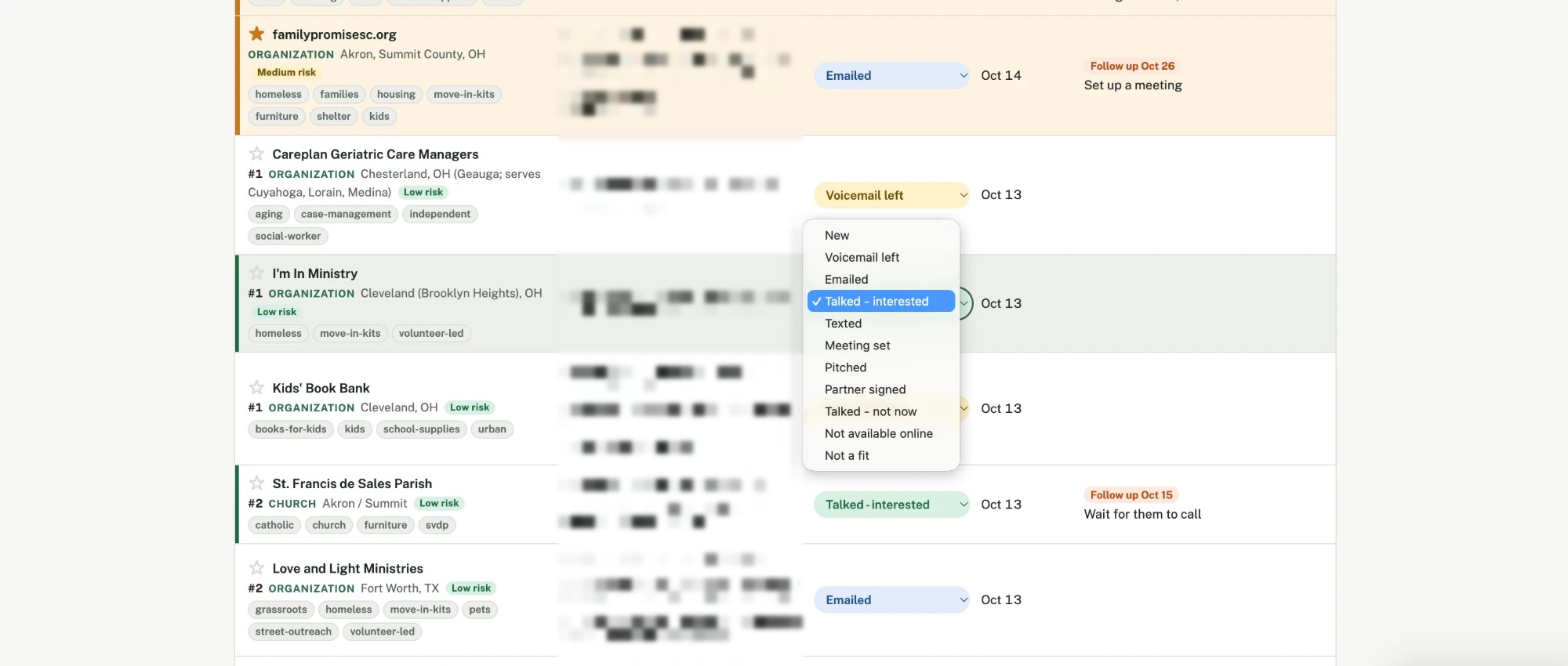
- A status model that matches the work. Eleven statuses, from New, Voicemail left, Emailed, Texted and Talked, interested, through Meeting set, Pitched and Partner signed, to Talked, not now, Not available online and Not a fit.
- Stars for priority. Starred contacts float to the top and show in the dashboard count.
- A dashboard of the day's work. Counts for all contacts, to call, follow-ups due, in progress, partners signed and starred, each one a filter.
- Next steps in the row. Follow-up dates and the next action sit beside the status, so the list reads as a plan, not a database.
- Filters that fit the domain. Search plus filters by type, tag, status and date added, or by tier and county in the fundraising view.
- The basics. Add contact and CSV export for anything the team needs outside the tool.
Email templates that write themselves
Templates fill in automatically from each record, with placeholders for the contact's first name, organization, program, why now and opening line, and, for Legion and Eagles, the tier, required giving, post number, county, distance and meeting schedule. Light formatting (bold, bullets, numbered lists) keeps them readable. When I need a new template, Claude drafts it from the research already in the record.
Why Claude Code
The whole tool is part of our Claude Code workflow. The research, the on-demand lookups and the email drafting run on the Claude Code usage we already have, not on a CRM subscription plus a data vendor. And I built it the same way I build everything at StuffRescue now: by designing the experience and directing Claude Code through prompts.
The outcome is a CRM that understands our world. It knows why a bingo-licensed post matters, when it meets, what a shelter's privacy rules allow, and what to say in the first sentence of the call.
Contact names, phone numbers, addresses and emails are blurred in the screenshots on this page.
Skills: Product Strategy, Internal Tools, AI Workflow Design, Claude Code, Information Architecture, Nonprofit Operations.